Some problems get solved cleanly. And then there’s this one.
The need: press the “volume +” button on the remote, and have the sound go up. That’s it. That’s all. It’s a feature that has existed for as long as remotes have.
At my place, it goes through an Android app, a webhook, Home Assistant, and a reflashed Wi-Fi infrared blaster. It’s not KISS at all. But it has been running without a hitch since November 2025, which is a little insulting.
The starting point#
My “TV” isn’t really a TV:
- an Nvidia Shield running Android TV, which does all the work;
- a plain monitor, with no speakers worth mentioning;
- between the two, a (slightly crappy) HDMI splitter with one rare quality: it has an optical audio output;
- on that optical output, a pair of Edifier R1280DBs powered speakers, with optical input, Bluetooth, and their own infrared remote.
On paper, it’s perfect. In practice, the volume button on the Shield remote does… nothing.
The reason: the Shield is set to “fixed HDMI volume”. It sends the audio at full level, untouched, and considers that adjusting the volume is the job of whatever is plugged in on the other end. When you press “volume +”, it just forwards the request over HDMI-CEC, the little protocol that lets HDMI devices control each other.
Except that on the other end sits the crappy splitter, which doesn’t understand CEC at all. And behind it, optical speakers whose very existence the Shield is unaware of. So the request goes nowhere.
There’s still the Edifier infrared remote, of course. But that’s two remotes, and you have to aim at the speakers. This is the 21st century, come on.
The reasonable solution#
The first idea is to untick “fixed HDMI volume”: the Shield then adjusts the volume of the audio it sends by itself. Except you end up with two volumes in a row. If the speakers are at zero (say, because someone turned them down while listening to their phone over Bluetooth), you can push the Shield all the way up, there’s still no sound. And you have to dig out the Edifier remote again. Back to square one.
The Shield remote does have an infrared emitter, though, and a menu to teach it to control an amplifier. Menu greyed out. According to the forums, you just need to turn off HDMI-CEC and reboot. I turned off HDMI-CEC, rebooted, unplugged, disabled Dolby, re-paired the remote, checked it was a genuine one: still greyed out. And even unlocked, it would only have offered a ready-made list of brands, with no way to learn the codes of a speaker that isn’t on it. I gave up.
That left the reasonable solutions:
- buy another splitter;
- or buy a soundbar that supports HDMI-CEC;
- or keep two remotes on the coffee table, like everyone else.
I did none of those.
The chosen solution#
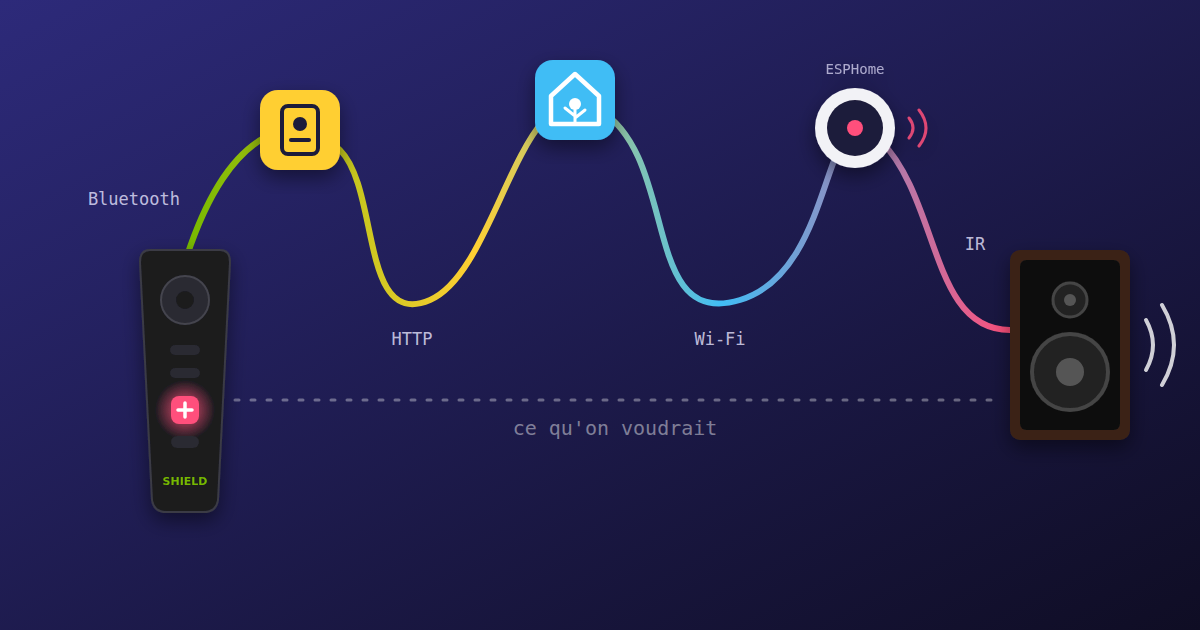
Instead, here’s what happens when I press “volume +”:
flowchart TD
    remote["🎮 Shield remote
« volume + » button"]
    app["📱 Button Mapper
on the Shield"]
    ha["🏠 Home Assistant
automation"]
    ir["📡 Tuya IR blaster
reflashed with ESPHome"]
    edifier["🔊 Edifier speakers"]

    remote -- Bluetooth --> app
    app -- "HTTP request (webhook)" --> ha
    ha -- "Wi-Fi (ESPHome API)" --> ir
    ir -- infrared --> edifier
    remote -. "what we'd like" .-> edifier
Five links, four protocols, one home automation server. For a volume button.
1. Intercepting the button#
On the Shield, the Button Mapper app (the paid Pro version, if you please) catches presses on the remote’s volume buttons, before Android can loftily ignore them. On each press, it sends an HTTP request, an action built right into the app: you just give it a URL.
2. The Home Assistant webhook#
That URL is a Home Assistant
webhook.
There are two of them, edifier_vol_up and edifier_vol_down, listened to
by a single automation with an understated name: [GP] WebHook vol up/down (GP for
“Grande Pièce”, the living room). Depending on which webhook is called, it
“turns on” the right switch on the ESP:
alias: "[GP] WebHook vol up/down"
triggers:
  - trigger: webhook
    webhook_id: edifier_vol_up
    id: edifier_vol_up
    allowed_methods: [POST, PUT]
    local_only: true
  - trigger: webhook
    webhook_id: edifier_vol_down
    id: edifier_vol_down
    allowed_methods: [POST, PUT]
    local_only: true
actions:
  - choose:
      - conditions:
          - condition: trigger
            id: edifier_vol_up
        sequence:
          - action: switch.turn_on
            target:
              entity_id: switch.edifier_volume_up
      - conditions:
          - condition: trigger
            id: edifier_vol_down
        sequence:
          - action: switch.turn_on
            target:
              entity_id: switch.edifier_volume_down
mode: single
The local_only: true at least prevents a stranger on the Internet from
turning up the volume in my living room. We have principles.
So Home Assistant, which already runs the rest of the house, is now also officially in charge of the TV volume. It has never complained.
3. The Wi-Fi infrared remote#
The last link is called ir00. It started life as a
“Tuya” Wi-Fi infrared blaster
bought for a few euros on AliExpress: a small box meant to be controlled by a
“Smart Life” app, through a cloud somewhere in China.
Inside, there’s an ESP8266. So all
it takes is opening the box, soldering a few wires onto the pads, flashing it
over serial with ESPHome, and now it only talks to
Home Assistant. It plays the part of the Edifier remote thanks to the
remote_transmitter
component.
Note that mine is a somewhat older version. Newer models replace the ESP8266 with a Beken chip, in a box that looks identical from the outside (the new version): ESPHome supports them too, but the flashing method is different.
A little tip for opening it: the case is clipped together, no screws. Rather than forcing it with a screwdriver, gently squeeze it in a clamp. The shell deforms, and the clips usually pop open without breaking.
A gadget designed to make life simpler, taken apart with a soldering iron to become part of an even more complicated chain. Very on-brand.
To get the codes, the box can also receive infrared
(remote_receiver). You
point the real Edifier remote at it, press each button, and ESPHome shows the
received code in its logs. Then you just copy it.
My current config copies these codes as is, in raw form: a list of pulse
durations in microseconds, like [8965, -4544, 520, -641, 519, …],
sixty-seven numbers per button. Each button becomes a switch entity in
Home Assistant, which you “turn on” to send the code.
It works, but while writing this post I realised it could be done much more cleanly:
- these codes are actually NEC, the most common infrared protocol. Instead of 67 durations, a button boils down to an address and a command;
- a
switchis meant for something that has a state, on or off. A remote button doesn’t have one: ESPHome hasbuttonentities for exactly that.
Which gives:
esp8266:
  board: esp01_1m

remote_receiver:        # to capture codes from the real remote
  pin:
    number: GPIO5
    inverted: true
  dump: nec

remote_transmitter:     # the infrared LED
  pin: GPIO14
  carrier_duty_percent: 50%

button:
  - platform: template
    name: Edifier Volume Up
    on_press:
      - remote_transmitter.transmit_nec:
          address: 0xE710
          command: 0xF609
  - platform: template
    name: Edifier Volume Down
    on_press:
      - remote_transmitter.transmit_nec:
          address: 0xE710
          command: 0xF30C
  - platform: template
    name: Edifier Volume Mute
    on_press:
      - remote_transmitter.transmit_nec:
          address: 0xE710
          command: 0xFF00
On the Home Assistant side, the automation then calls button.press instead
of switch.turn_on. It doesn’t change the result, but it’s more honest.
The most galling part: it works#
I’d love to tell you that the whole thing is fragile, that something needs rebooting every week, that the sound goes up with a two-second delay.
Nope.
The latency is imperceptible, and it hasn’t failed once since November 2025. The only real limitation: if Home Assistant is down, you can no longer adjust the TV volume. Which, for a TV, is quite a remarkable dependency.
Takeaways#
This setup ticks pretty much every over-engineering box: lots of parts, a central point of failure, and a simple solution (a setting, a cable, another device) that surely existed.
But it also has a few qualities, which you might call excuses:
- all the hardware was already there (the Shield, the speakers, Home Assistant, and a reflashed IR blaster that cost a few euros);
- it’s the speakers’ volume that gets adjusted, not the Shield’s. So it also works when they’re on Bluetooth, playing music from a phone: the Shield remote adjusts the sound… of the phone. Rather handy, for once;
- and it was more fun than hunting for the right menu in the audio settings (which is greyed out anyway).
You might think that with the volume in Home Assistant, you open the door to lots of clever automations: lowering the sound when someone rings the doorbell, capping it after 10 pm… Nope. Infrared only works one way: Home Assistant can say “louder” or “quieter”, but it has no idea of the actual level. And since you can always turn the knob directly on the speaker, there’s no way to guess it by counting presses. All that infrastructure for a volume Home Assistant knows nothing about.
In short: it’s not KISS at all, it’s absurd, and I have no intention of touching it. It works.