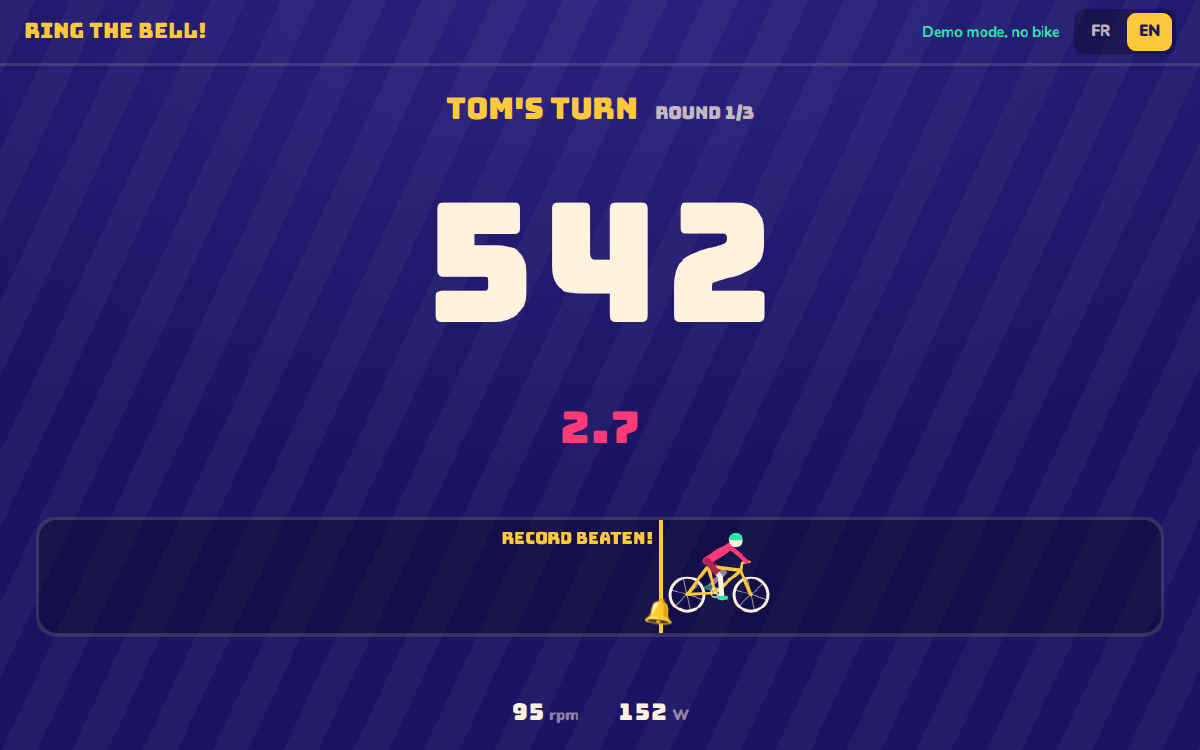
For my son’s birthday, I had a slightly silly idea: put a kid’s bike on a home trainer, hook it up to a screen, and have the kids take turns pedalling as fast as they can. Whoever goes the furthest rings the bell.
From the start, the idea was a quick game: each kid pedals for 20 to 45 seconds, then it’s the next one’s turn. It moves fast, nobody waits long for their turn, and you can play several rounds in a row.
So the game is called Sonne la cloche ! (“Ring the bell!”), and the code is on GitHub.
Version 1: two prompts#
I didn’t really write the first version. I asked Claude for it, literally in two prompts: one to describe the game, one to fix what wasn’t working.
The result was a single web page that reads the home trainer over Bluetooth, straight from the browser. No app, no server: Chrome can talk Bluetooth (Web Bluetooth), and most home trainers expose a standard protocol, FTMS (Fitness Machine Service), which provides cadence and power.
The code didn’t look like much, but it worked.
Version 2: it works, so let’s redo it properly#
And on the big day, it worked really well. The kids were all in, queuing up to have another go.
Given how well it went, I wanted to turn it into something a bit more solid, that we could bring out again at the next party (or that others could enjoy too). Still with Claude, but being more precise about the how.
I gave it the first project as a starting point, along with technical guidelines: React, TypeScript, unit tests and end-to-end tests. The architecture, however, stays deliberately simple: a client application running in the browser, with no server and no account.
From there, I went through a few iterations to improve the game, each with a specific goal:
- the bike stuttered on screen: fixed, with a test that checks smoothness;
- the “Next” button shows the next player’s name, so there’s no doubt about who gets on the bike;
- the bell marks the record to beat (or a target in the first round), and it rings when you pass it;
- after each ride, a more complete summary (averages, peaks, a per-round table), and three awards at the end of the game;
- the screen clearly shows the bike’s status: no bike, demo mode, connected, connection lost;
- and a little cyclist drawn in SVG, pedalling at the measured cadence.
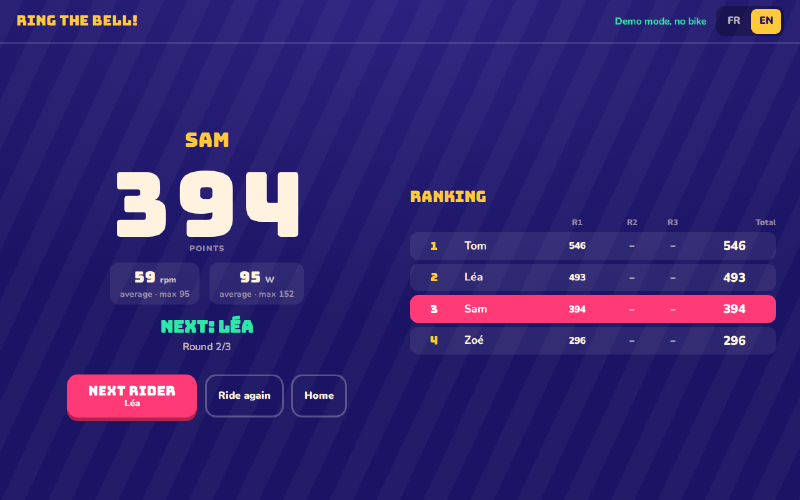
Along the way, the demo mode (hold a button to pedal) turned out to be really handy: it lets you test without a bike, including in the automated tests.
What I take away from it#
For a one-off need like this one, two prompts are enough. It’s a bit dizzying, but that’s how it is: a game that runs on the day of the party, without having written, or even read, the code.
To go further, though, you have to take back some control: choose the stack, ask for tests, then move forward in small steps. Claude still writes most of the code, but that framework is what lets the project evolve without breaking everything.
And clearly, without AI, I wouldn’t have had the time to tinker with this little game.
Try it#
The game is online at https://sonnelacloche.enavarro.eu/en/. You need Chrome or Edge (Safari, Firefox and iOS don’t support Web Bluetooth). Without a bike, the “Try without a bike” button lets you play by holding a button on screen (or the space bar).
With a home trainer, the only real trick: close every other app that might be connected to it (Zwift, the manufacturer’s app, your watch…), and use the lowest gear with the resistance at its minimum, otherwise little legs give up after ten seconds.
What’s next#
Do you like it? Send me your feedback!
One thing intrigues me: in theory, the game doesn’t need a fancy home trainer. It can already read a simple Bluetooth cadence sensor (CSC profile), so a stationary bike with a brake and a cheap sensor should do the job. I’d be curious to see how such a “low-cost home trainer” fares with the game.